How the Node event loop works, visually
Node runs on one thread yet never blocks. Watch one async callback wait in the queue and get pushed onto the call stack to see how.
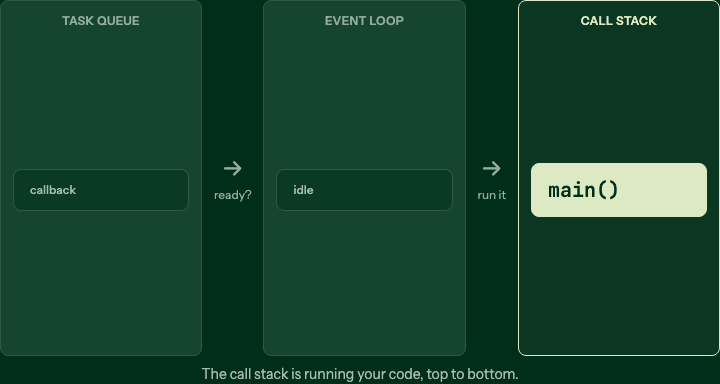
Your code runs first
While your code runs, the call stack is busy and nothing else can.
Step 1 of 4
If you have been told Node is "single threaded" and "non blocking" in the same breath and wondered how both can be true, the event loop is the answer. Step through the scene above first, then read on.
One thread, one stack
JavaScript runs on a single thread with a single call stack. Whatever is on the stack runs to completion before anything else can. That is why a long loop freezes everything: nothing else gets a turn.
console.log("first");
setTimeout(() => console.log("third"), 0);
console.log("second");
This prints first, second, third, never first, third, second. The
timer's callback cannot run until the stack is empty, no matter how small the delay.
The queue and the loop
So where does the callback go while it waits? Into a queue. When the stack is empty, the event loop takes the oldest waiting callback and pushes it onto the stack. That is the whole job of the loop: move waiting work onto the stack, one item at a time, and only when the stack is clear.
The timers and I/O that produce those callbacks run elsewhere, in a thread pool and in the operating system, which is how one thread stays non blocking. For the full model, including the thread pool and the phases within a single tick, see the Node.js event loop guide and then walk the lesson step by step.
Common questions
- Is the event loop the same as multithreading?
- No. Your JavaScript runs on one thread with one call stack. The loop only decides which waiting callback runs next when that thread is free.
- Why does setTimeout(fn, 0) still wait?
- Because fn goes into the queue, and the queue is only checked after the current stack finishes. Zero means "as soon as possible", not "right now".
- Where do the timers and I/O actually run?
- Off the main thread, in libuv's thread pool and the operating system. When they finish, they hand a callback to the queue for the loop to pick up.
Keep reading
Blocking vs non blocking in Node, watch the thread pool
One readFileSync freezes every user on your server. Watch the thread stop on one line, then hand the read to a worker and answer everyone else meanwhile.
401 vs 403, the difference in one request
401 means the server doesn't know who you are; 403 means it does, and the answer is no. Watch one request hit both gates.
Express middleware explained, step by step
Middleware is a line of functions every request walks before your handler. Watch three stations stamp one request in order, then a missing token stop it early.