What "port 3000 already in use" actually means
EADDRINUSE means a process is still listening on that port. Watch one machine give door 3000 to the first process, refuse the second, then fix it both ways.
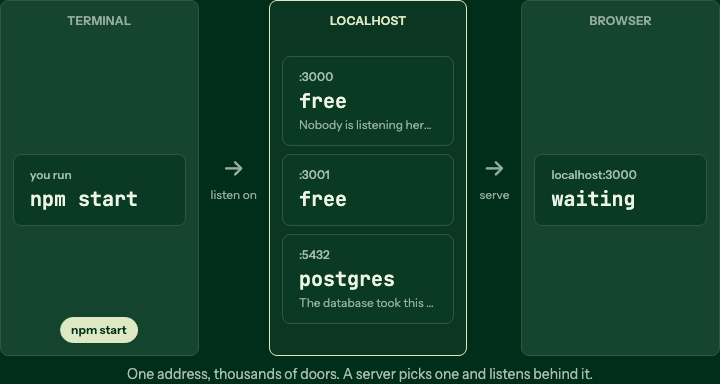
One machine, many numbered doors
Your laptop is one address. Every program that wants requests picks a port, a numbered door, and waits behind it.
Step 1 of 6
Error: listen EADDRINUSE: address already in use :::3000 is the first error most
people meet in backend work, and the message is more honest than it looks. Nothing is
broken. Something is running. Step through the scene above to see what a port is, and
why the operating system said no.
A port is a door number on your machine
Your laptop is one machine at one address, 127.0.0.1, better known as localhost.
It runs many programs at once, and each one that wants to receive requests picks a
number, a port, and waits behind it. The database sits on 5432, a Node server on
3000, maybe another API on 8000. When a request arrives, the number after the colon
in localhost:3000 is what picks the program.
npm start
# > Listening on http://localhost:3000
That log line means your process asked the operating system for door 3000 and got it.
From then on, anything addressed to :3000 is handed to that process and nothing else.
This is the rule the whole error rests on: one port has one listening process.
What actually happened
You ran npm start, it took port 3000, and you kept working. Later you opened a new
terminal and ran npm start again, forgetting the first one was alive in another tab.
The new process asked for door 3000, the operating system saw it was already taken,
and refused with EADDRINUSE. The old server is still running fine. The new one never
started.
It is the operating system keeping its promise, and that is why the fix is never in your code. Either find the old process and stop it, or start the new one on a free door:
lsof -i :3000          # which process holds 3000? read the PID
kill 412               # stop it, then npm start again

PORT=3001 npm start    # or leave it alone and take the next door
Two things worth knowing on sight. EADDRINUSE is not ECONNREFUSED: the first
means a port is taken, the second means nothing is listening at all. And localhost
never leaves your machine, so nobody else can see your port 3000 and nobody else can
be holding it. The
Node docs on server.listen cover
the bind itself; the lesson lets you run five services on one machine and hit the
collision yourself.
Common questions
- How do I find what is using port 3000?
- On macOS or Linux run `lsof -i :3000` and read the PID column; on Windows run `netstat -ano | findstr :3000`. Nine times out of ten it is an older copy of your own server in a terminal tab you forgot about.
- Is it safe to just kill the process?
- If it is your own dev server, yes. `kill <pid>` asks it to exit; `kill -9 <pid>` forces it. Check the process name first, so you do not stop the database or something else you meant to keep running.
- Why does it work after I restart my computer?
- A restart ends every process, and a port is only held while the process that bound it is alive. The reboot did not fix a bug; it closed the tab you could not find.
- Can two apps ever share one port?
- Not on the same address. One port has exactly one listening process. Run the second app on another port, such as 3001, or put a reverse proxy on one port that forwards to both.
Keep reading
Blocking vs non blocking in Node, watch the thread pool
One readFileSync freezes every user on your server. Watch the thread stop on one line, then hand the read to a worker and answer everyone else meanwhile.
401 vs 403, the difference in one request
401 means the server doesn't know who you are; 403 means it does, and the answer is no. Watch one request hit both gates.
Express middleware explained, step by step
Middleware is a line of functions every request walks before your handler. Watch three stations stamp one request in order, then a missing token stop it early.